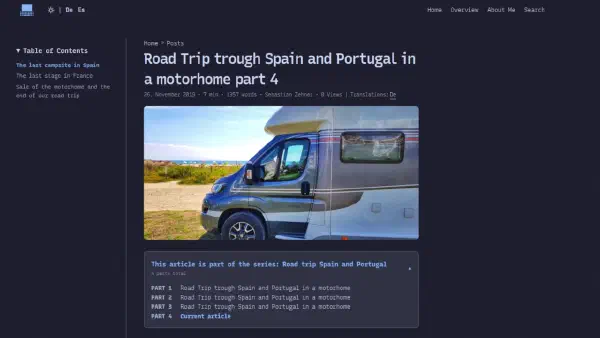


Those who have known my blog for a while might not even have noticed the change right away, and that’s actually a good sign. The content remains the same, as do the URLs. What has changed is the underlying framework: the Hugo theme.
For a long time, this blog was running on the following setup:
A slim, fast, and widely used theme for Hugo.
PaperMod did a great job, and I was satisfied with the result. Over time, I made some adjustments and additions to it. The Hugo update also brought about some changes to the language parameters, which I needed to modify accordingly.
By chance, I came across Blowfish, and what I saw there immediately caught my attention. Not because PaperMod was bad, but because Blowfish includes some useful features that directly improve the blog’s usability—features that I would have had to implement myself in PaperMod.
What convinced me about Blowfish#
Blowfish is a modern Hugo theme created by Nuno Coração, which is built on Tailwind CSS and looks significantly more contemporary than PaperMod. What convinced me wasn’t just its appearance, but mainly the features that truly make a difference in everyday use.
GitHub-style alerts can be directly added using Markdown, and this is possible without having to use any custom shortcodes.
This is what a note looks like when it’s written directly in Markdown format.
With PaperMod, I would have to write my own shortcode and CSS for that.
With Blowfish, I just type > [!NOTE] and that’s it.
Repo cards features for GitHub, Forgejo, and Codeberg; icon support; built-in search functionality as an overlay; a Zen mode for uninterrupted reading; accessibility settings (font size, blur effect, highlighting of links), and all of this comes pre-installed with Blowfish, without any need for me to make any adjustments myself.
In addition, there’s a very active community and a documentation that’s really excellent.
The migration process was more complicated than expected#
It would be dishonest of me to claim that the migration process was easy.
Blowfish has a different configuration structure compared to PaperMod; instead
of having a single hugo.yaml, there are multiple files under
config/_default/:
config/_default/
├── hugo.toml
├── languages.de.toml
├── languages.en.toml
├── languages.es.toml
├── markup.toml
├── menus.de.toml
├── menus.en.toml
├── menus.es.toml
└── params.toml
This might seem like more work at first, but in the long run it’s much more straightforward to manage, especially for a multilingual blog like mine.
The actual the real effort task was to migrate all the posts to the Page
Bundles: Instead of having individual .md files, each article now has its
own folder containing index.md, index.de.md, index.es.md and all the
corresponding images right beside them. This makes the project much neater
overall.
content/posts/my-blogpost/
├── background.webp
├── featured.webp
├── index.de.md
├── index.es.md
└── index.md
What I built myself and what Blowfish already includes#
With PaperMod, I wasn’t satisfied with the default settings, so over time I built and modified several things myself: an extended Table of Contents (TOC), a “Series” function for multi-part articles, and the integration of Cactus Comments – a privacy-friendly commenting system based on Matrix.
Blowfish comes with the TOC (Table of Contents) and series structure out of the
box; everything is configurable via params.toml – no need for any custom
template code. This saved me from having to create several custom partials
myself, which I could simply delete after the migration was complete.
I continue to use the Cactus Comments plugin because it fits perfectly with my
self-hosted Matrix Homeserver. The integration now works through Blowfish’s
official comments.html hook – which is much cleaner than before. I also took
the opportunity to install the new version of Cactus, which supports multiple
languages and isAuthenticated.
This was particularly important: on the Synapse side, I was able to re-enable
enable_authenticated_media: true, which significantly improves media security.
Catppuccin as color scheme#
Those who know my blog know that Catppuccin is my favorite palette, in
the Terminal, Neovim, and on my blog. Blowfish allows for the use of custom
color schemes via a simple CSS file located at
assets/css/schemes/catppuccin.css.
The special thing about this is that Blowfish uses Tailwind CSS along with CSS variables for all the colors. This allows for a clean and consistent representation of both Catppuccin Latte (Light Mode) and Catppuccin Mocha (Dark Mode):
--color-neutral-*is used for the background and text colors--color-primary-*is used for the blue color (links, buttons)--color-secondary-*is used for the mauve color (for inline code, badges)
The result is a blog that feels like it belongs perfectly to my entire Linux setup at home.
What I miss#
Honesty is important here: PaperMod was faster. It’s a minimalist theme with minimal overhead, and you can tell that from both the build times and the page weight. Blowfish includes more JavaScript and CSS files; it’s not a dramatic difference, but it’s worth mentioning nonetheless.
Additionally, Blowfish is built on Tailwind, which means that anyone who wants to make custom modifications must be familiar with the Tailwind classes or be willing to learn something new. This isn’t necessarily a disadvantage, but it does represent a difference from PaperMod, where you could simply override CSS variables.
Conclusion#
The switch was worth it. Blowfish looks more modern visually, has more features, and allows me to do many things that I would have had to build myself with PaperMod. The migration process was complicated, but it was worthwhile; now the blog is on a solid foundation.
For those using Hugo and considering choosing a theme, I recommend taking a look at blowfish.page. The demo page shows many of the features in action, and getting started is easy thanks to the comprehensive documentation available.
If you have any questions about migration or how to customize Catppuccin, feel free to leave a comment!